RealCoach
Designed the MVP for a trainer management platform that later reached 30,000 monthly active users, helping trainers manage clients, schedules, and sessions in one place
RealCoach History and Achievements
2024
- Selected for the Youth Startup Academy by the Korea SMEs and Startups Agency (KOSME).
- Achieved cumulative sales of 500 million KRW in the first half of 2024.
2025
- Launched the fitness membership management app RealCoach and reached 30,000 MAU (Monthly Active Users).
- Selected for the Startup Package by the Korea Small and Medium Business Administration.
Sole designer on an 8-person technical team.
- Role
- UI/UX Designer
- Team
Juwon Chun + 7 others
- Timeline
- 2023 · 6 months
- Tools
- Figma, Illustrator, Photoshop
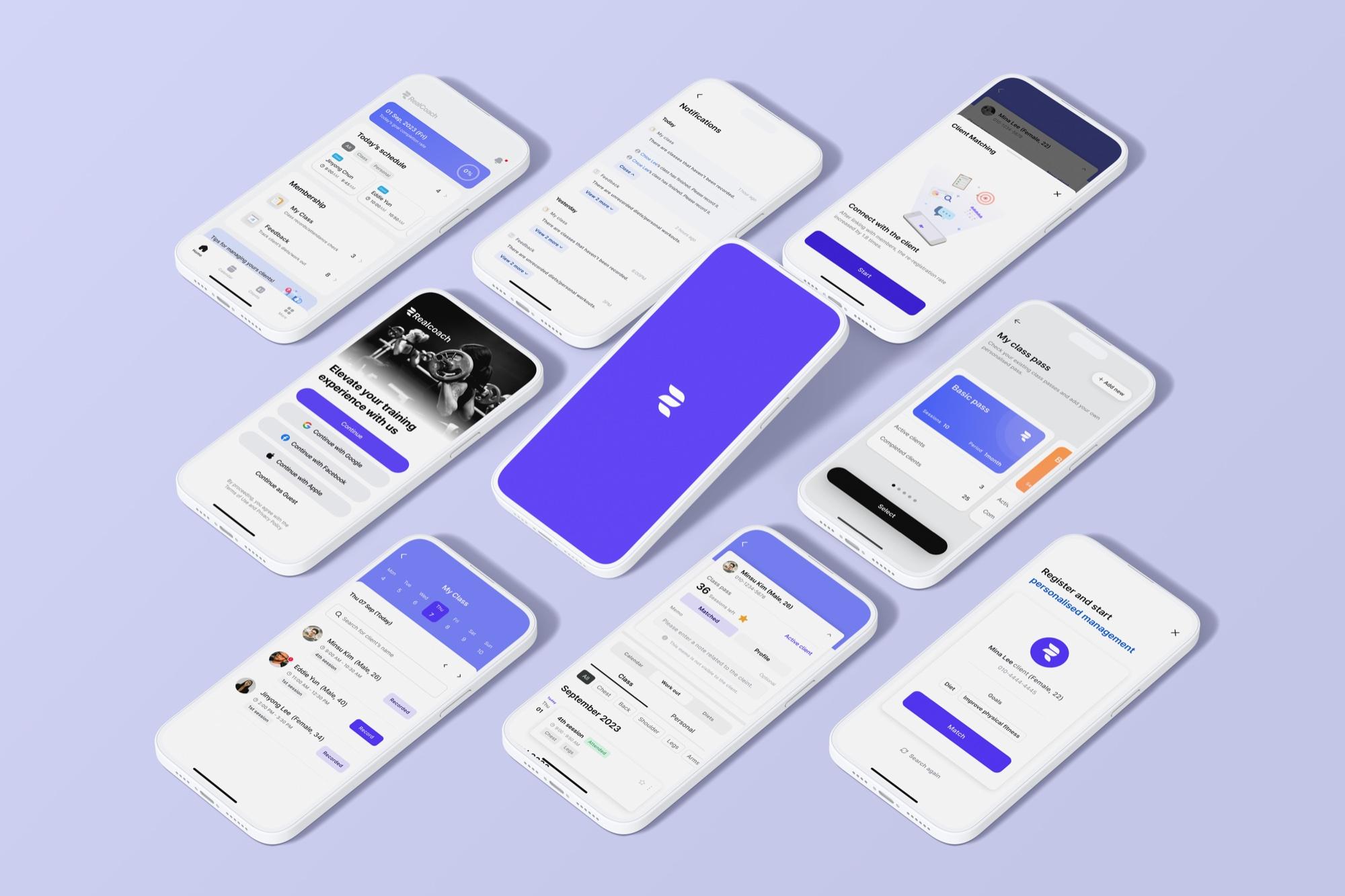
Overview
RealCoach is a trainer-facing MVP that centralizes client management, scheduling, attendance, and session history so personal trainers can run their day without jumping between KakaoTalk, spreadsheets, and paper logs.
On a cross-functional team of eight, my ownership covered:
Ownership
- UX research and synthesis
- Product framing for the trainer MVP
- User flows and information architecture
- Wireframes through high-fidelity UI
- Design system and component documentation
- Developer handoff and implementation support
This was my first UI/UX project. During a gap year I was learning to code when a developer friend asked me to design the RealCoach MVP and work directly with engineers under real constraints: limited feedback, a small team, and a six-month timeline to a usable product.
Research
We surveyed 160 of RealCoach’s early sign-up trainers (2023).
Primary research from that survey informs the findings below. Additional market context is cited from Korea Consumer Agency and Korea Sports Industry Promotion Institute reports.
Most were early-career trainers still building a client base, open to better tools only if those tools matched how they already operated.
Key findings
- Trainers switched between multiple tools every day (chat, calendar, notes, sheets)
- Attendance and session notes were mostly manual or informal
- KakaoTalk had become the unofficial CRM for client communication
- Session history was hard to find later, which weakened coaching continuity
- Scheduling and class-pass tracking lived in separate places, so mistakes were common
External data
of gyms had no registered price information
2019, Korea Consumer Agency
160 personal trainers surveyed
Trainers often record and track client progress using paper

Progress Tracking
Trainers manage their schedules on external apps

Scheduling
*KakaoTalk: major messenger app in Korea
Trainers communicate with clients via KakaoTalk

Communication
Challenge
Clients
It’s 70,000 KRW per hour, but they only provide price information if you visit in person, and the class was different from what was discussed during the consultation.
Illustrative, based on Korea Consumer Development Institute findings
47.6%
External data
Different from the expected service
2019, Korea Consumer Development Institute
Trainers
For Clients, it’s 1:1, but for me, it’s 1:30. I need to take care of Workout logs on paper, Communication with all the clients on KakaoTalk, organise on Excel…
Illustrative, based on Korea Sports Industry Promotion Institute findings
43.7%
External data
Inconvenience of analog-style management
2019, Korea Sports Industry Promotion Institute
The opportunity
Replace ad-hoc admin with a structured daily system that brings everything trainers need into one place.
Design principles
These principles kept every flow decision anchored to what research showed.
- 01
Reduce context switching
Combine the workflows trainers already jumped between into one daily surface.
- 02
Prioritize today’s work
The home experience should answer “what do I need to do now?” before deeper planning tools.
- 03
Make records easy to leave behind
Attendance and notes should be structured enough to capture after a lesson without becoming a form burden.
- 04
Keep history available without clutter
Past clients, passes, and sessions should stay accessible, but not crowd the active working set.
Solution
The broader vision includes separate trainer and client apps. This MVP ships the trainer side first, where the operational pain is sharpest.
Reduce manual administration
Cut down the time spent on attendance, passes, and follow-ups.
Centralize the daily workflow
Bring schedules, clients, and class operations into one place.
Create structured client records
Build consistent, reliable records that engineers can scale on.
Solution
- Digitalised member management
- Exposure of member management data
- Member management as a career asset
Impact
- Reducing trainer inconvenience
- Addressing information asymmetry
- Creating a positive cycle in PT services
Product tour
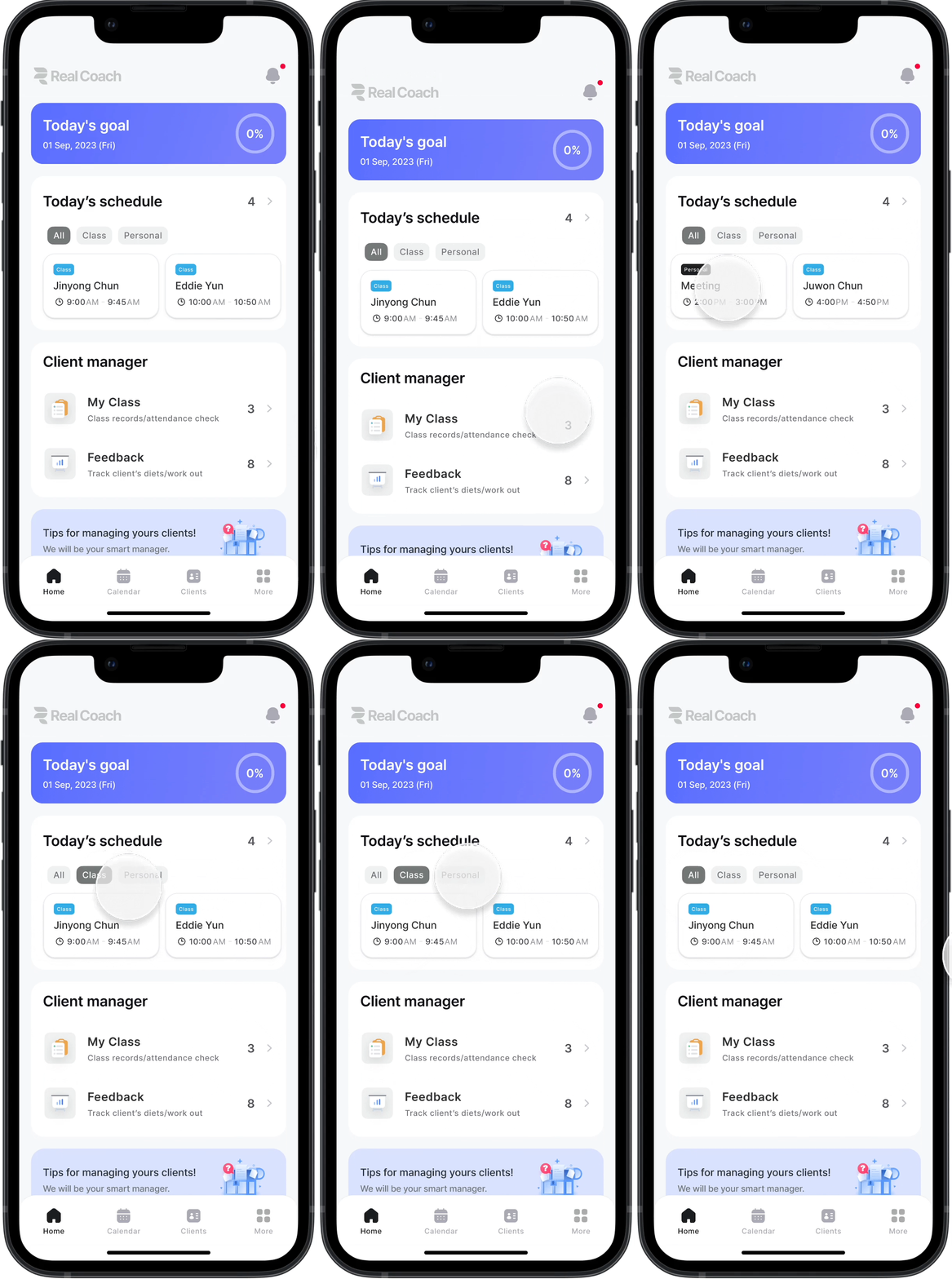
01
Home
Trainers start the day by checking what is happening now. I combined today’s schedule, filters, attendance follow-ups, and client tasks into one dashboard so they could act without switching apps.
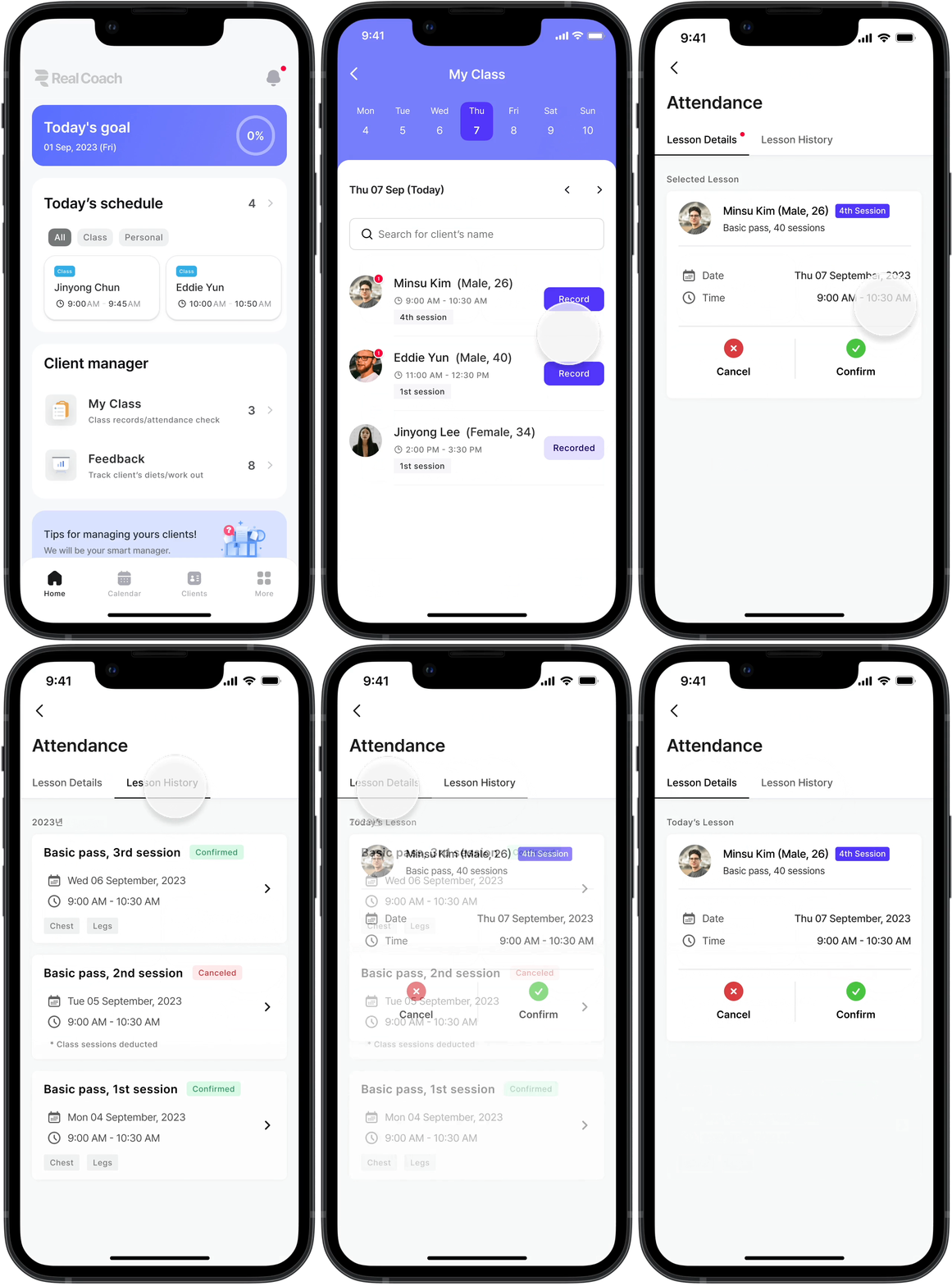
02
My class
Class views needed to answer who is coming and when without opening a separate roster. I designed date-based class overviews so trainers can prepare for the next session from one place.
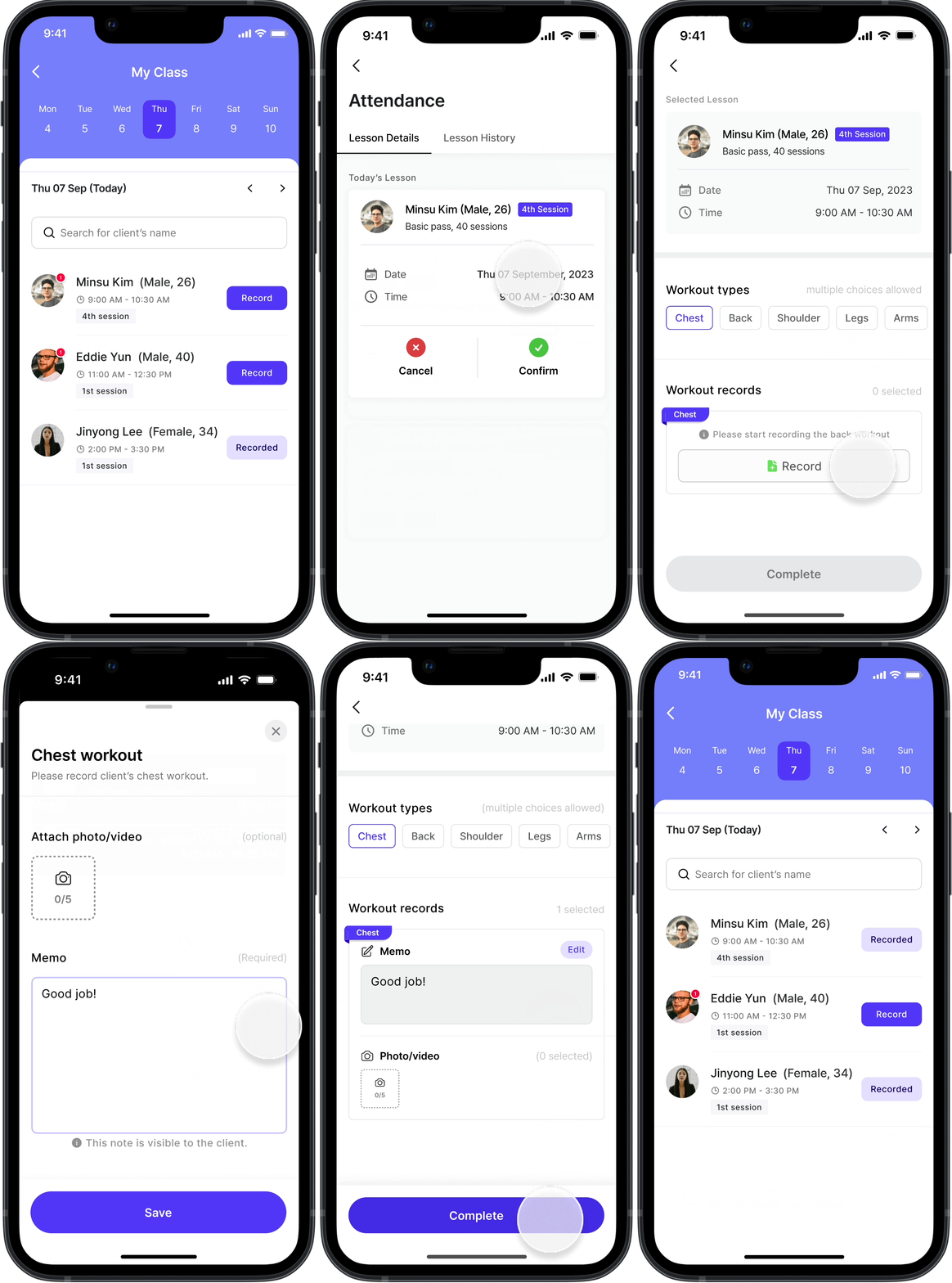
03
Attendance & report
After a lesson, details disappear quickly if they stay in chat or memory. I designed a structured close-out: confirm attendance, pick a workout type, and attach notes or media while context is still fresh.
04
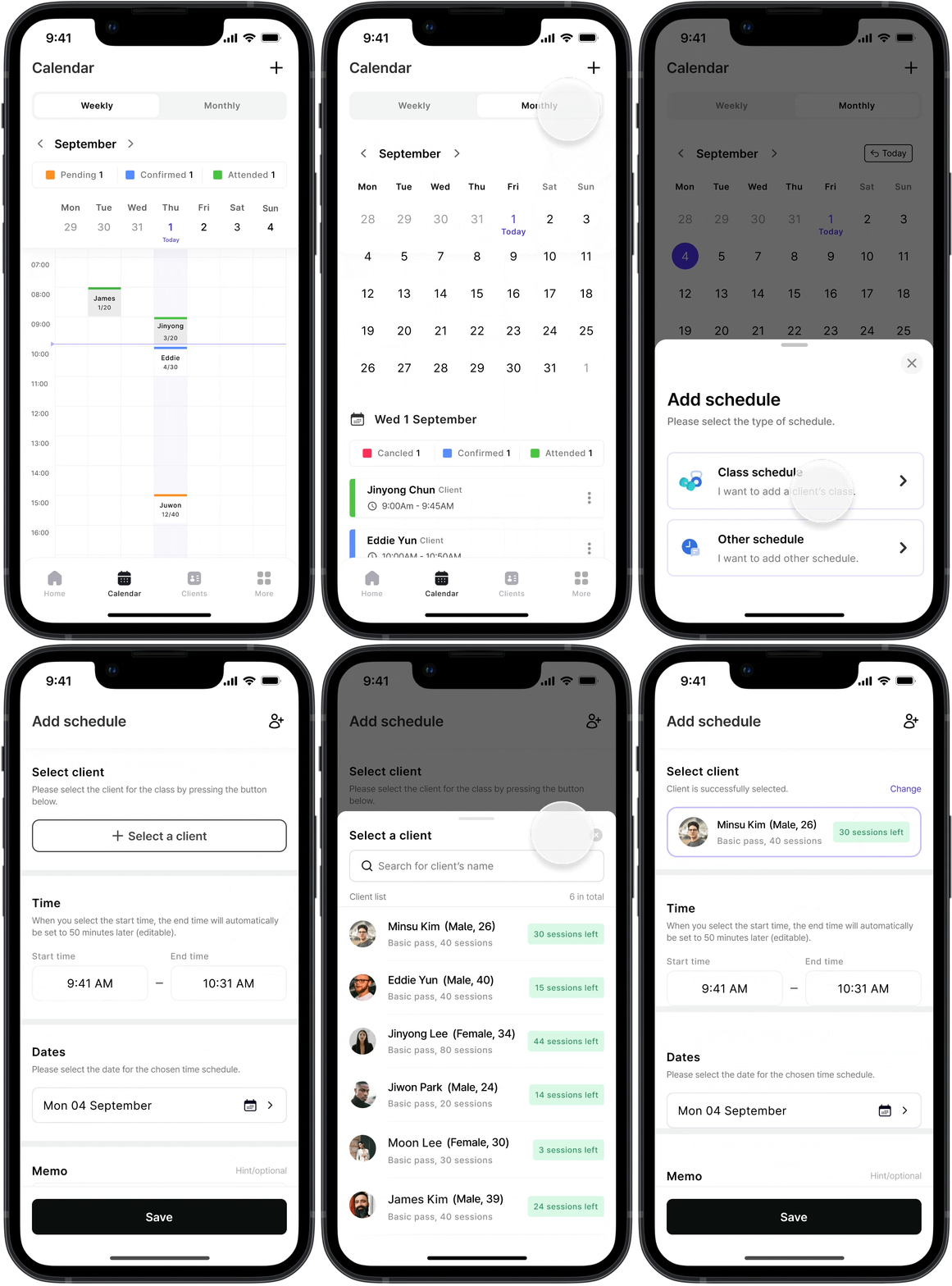
Calendar
Trainers plan both the immediate week and the wider month. Weekly and monthly views with clear statuses (Pending, Confirmed, Attended) made it easier to scan commitments and spot gaps.
05
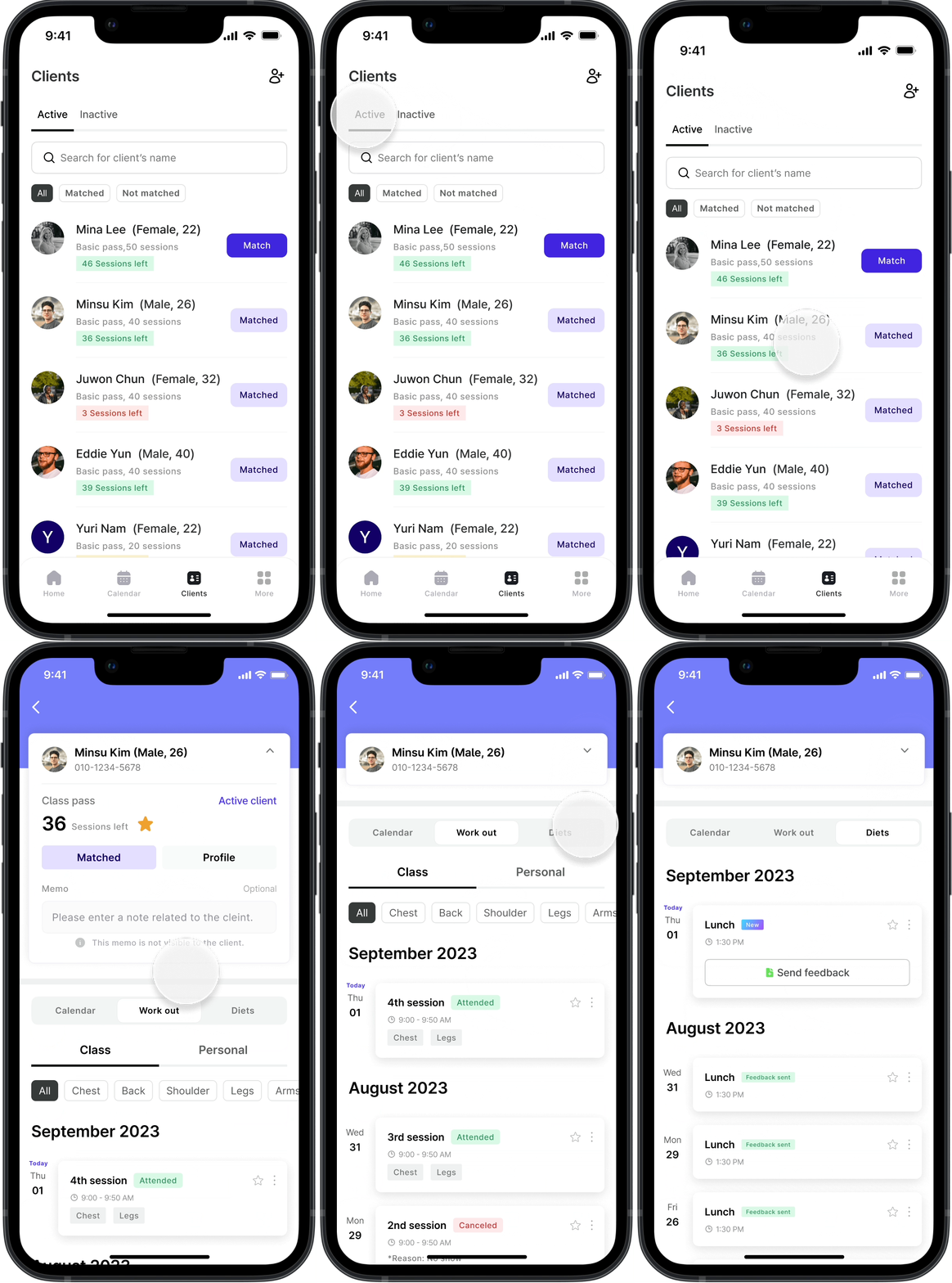
Clients
Mixing active and inactive clients made the list feel noisy. Separating those states reduced clutter while keeping session availability and follow-up paths easy to reach.
06
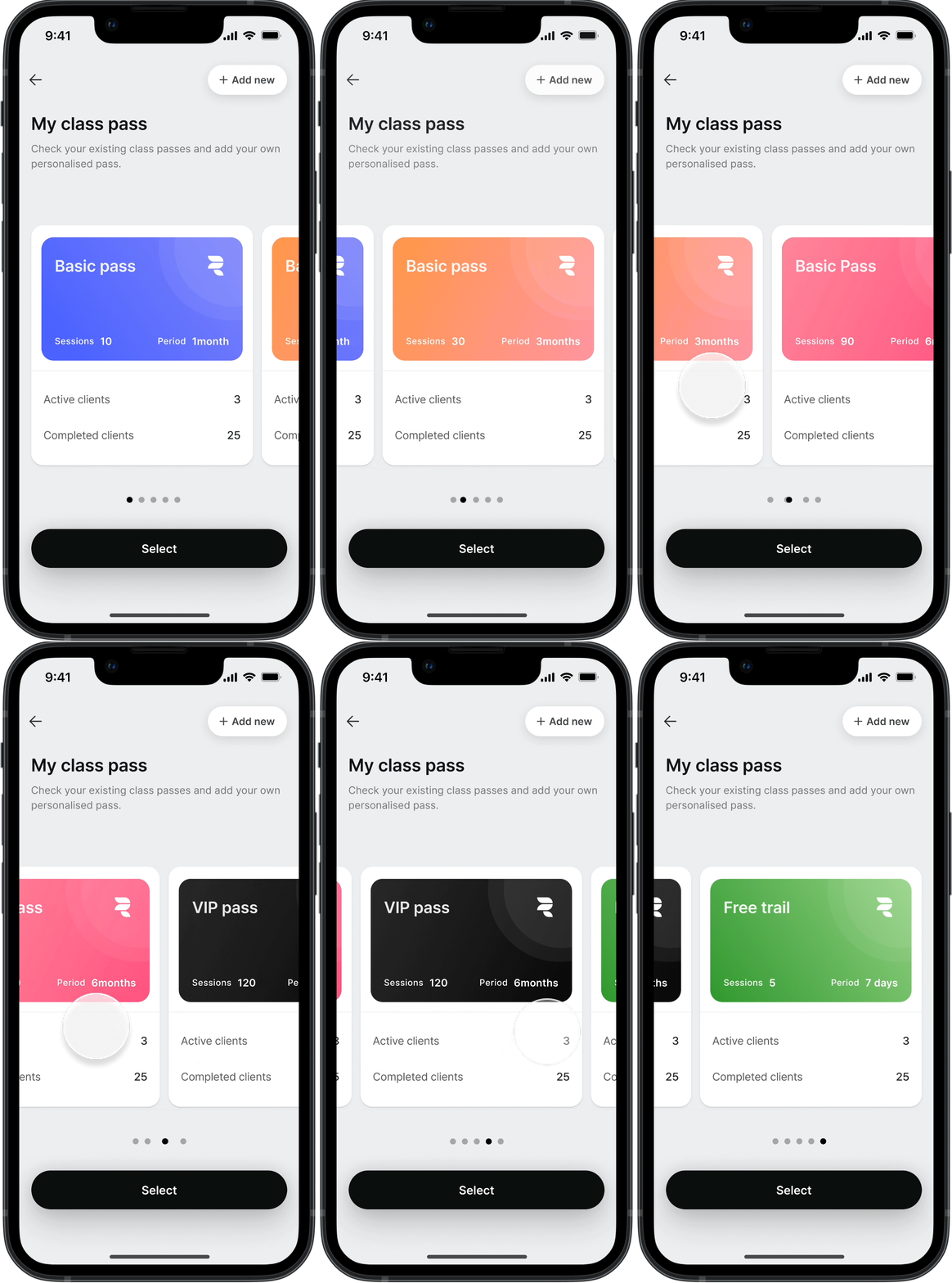
Class pass
Pass counts were often tracked in spreadsheets, which broke trust when numbers drifted. I designed pass creation and usage history so remaining sessions stayed visible and auditable.
07
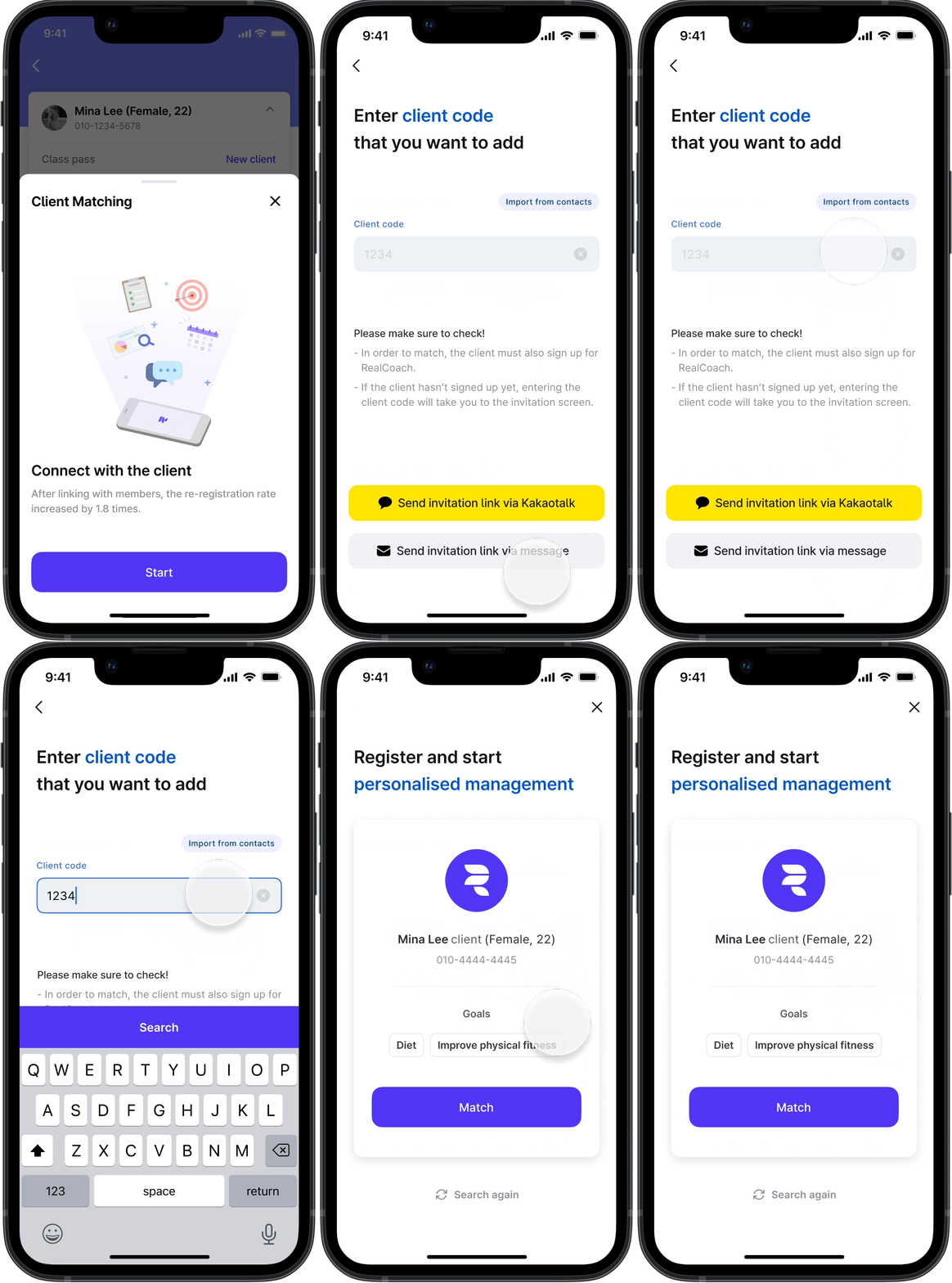
Client matching
Onboarding a client had to fit existing habits in Korea. Code lookup, contact import, and KakaoTalk/SMS invites lowered the friction of moving a relationship into the product.
Design system
Consistency mattered as much as visual polish
Handing work to multiple engineers, I documented foundations, components, and flows in Figma so implementation did not depend on one-off screenshots. Full files cannot be shared for security reasons.
Reflection
With limited feedback, I relied on design shadowing: studying existing apps in Figma and asking why a pattern worked before adapting it.
The harder lessons were product ones — scoping with engineers to what could ship in six months, documenting decisions for handoff, and trading polish for clarity when a flow needed to be implementable.
The work confirmed that the problem solving I want to keep doing sits between user workflows, cross-functional collaboration, and iteration, not polished screens alone.